Example: GCP
- antoine hage
- Ragheb Bou Dargham (Unlicensed)
In this example we will demo how to deploy SOAJS by leveraging a Kubernetes cluster running on GCP. You need the following:
- Create a kubernetes cluster using the GCP console
- Create a mongo cluster using mongoDB cloud.
- Make sure you whitelist the IP(s) of the kubernetes cluster and your IP of the machine you will run the installer from
- SOAJS Installer. click here to learn more
Installation steps
1- you need to create a configuration file as follow:
2- Run the following command:
sudo soajs remote-installer install /..PATH_TO../myconfigfile.json
3- Access SOAJS console.
You need to change the DNS of your domain and then open your browser and go to http://sitePrefix.domain:httpPort/, in the above configuration example it will be: http://dashboard.soajs.org:30080/
Kubernetes on GCP
This is an example of how to pull the required information to use your Kubernetes Cluster on Google Cloud:
Auth Token
- Click o the connect button in the Kubernetes Cluster
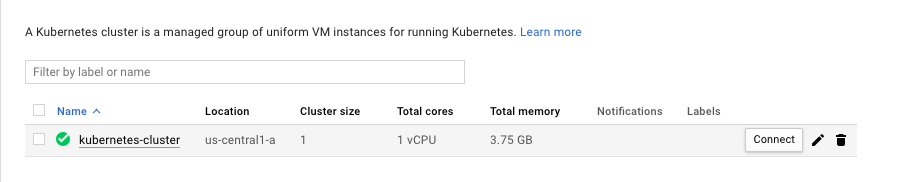
- Click on Run in Cloud Shell on the menu that pops-up.
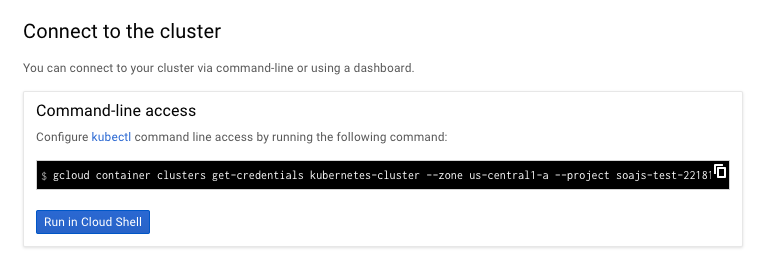
Run this Command in the browser Shell
kubectlkubectl describe secrets
Endpoint IP
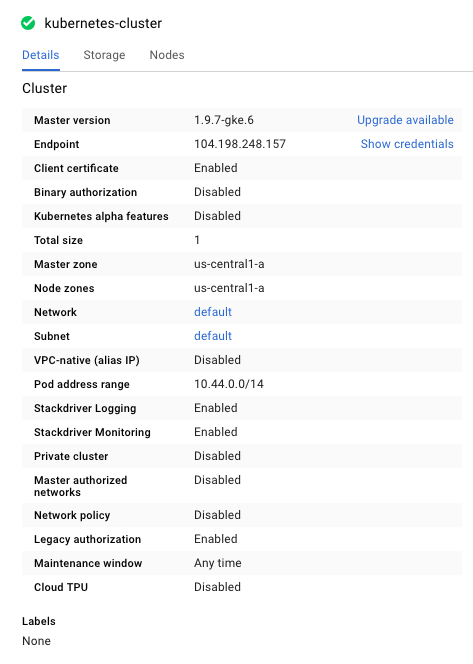
- Click o the name of the kubernets cluster. In the image below, the name is the kubernetes-cluster.
- The Endpoint IP is value of the Endpoint int he table below:
Port
The port of the Google Cloud Kubernetes Cluster is 443.
RBAC Authorization
You should bind your Default Service Account (system:serviceaccount:default:default),which is the default account on namespace default bound to Pod with a role cluster-admin. SOAJS needs super permissions to manage your cluster.
- Click o the connect button in the Kubernetes Cluster
- Click on Run in Cloud Shell on the menu that pops-up.
Run this Command in the browser Shell
kubectlkubectl apply -f PATHTOFILE/rbac.yaml